

Student's Guide to Student Information System
Student User Names are a student’s 10 digit ID number + @s.tusd1.org For Example: [email protected]
(Contact your school if you do not have your account details.)
For more information about StudentVue review StudentVUE Basics.
You can also access StudentVUE via the StudentVUE App for iOS and Android.
StudentVUE Has a New Look!
The functionality remains the same, but StudentVue has been given a redesign. There is also a new Detail toggle feature. Wherever you see a Detail toggle, you can click it to expand or collapse information. See StudentVUE Basics.
Frequently Asked Questions
How does it help me?
You always know what's going on in your classes, even if you miss school or forget to write down the homework.
Is there an app I can use?
Yes! Synergy® StudentVUE is available for iOS and Android.
How do I upload an assignment to StudentVUE?
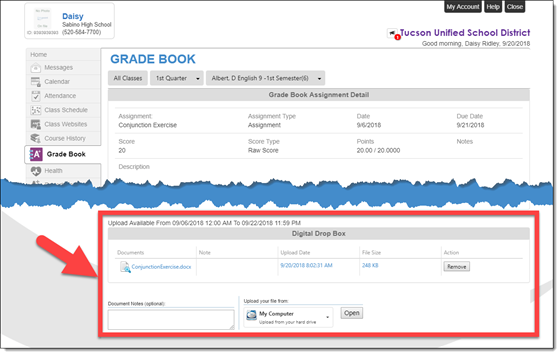
It’s easy! If your Teacher set up an assignment that uses the Drop Box feature, just sign on to StudentVUE, open Grade Book, find the assignment and click it to open Assignment Detail. In the Digital Drop Box area, click Open, find and select your assignment file, and upload it. Check out the illustrated instructions for more details: StudentVUE: Turn In Assignment Through Drop Box.
What information is available to my parents?
The same information that's available to you in StudentVUE!
520-225-6262
Posted/Revised Date
07/17/2026
Summary
Information about Synergy, Tucson Unified School District's student information system.
Keywords
article, 2026-2027, schools, tucson, student information system, technology services
Related Content